Switching Recruiting CRM: The Complete UK Guide (Bullhorn, Vincere, Firefish & Loxo)
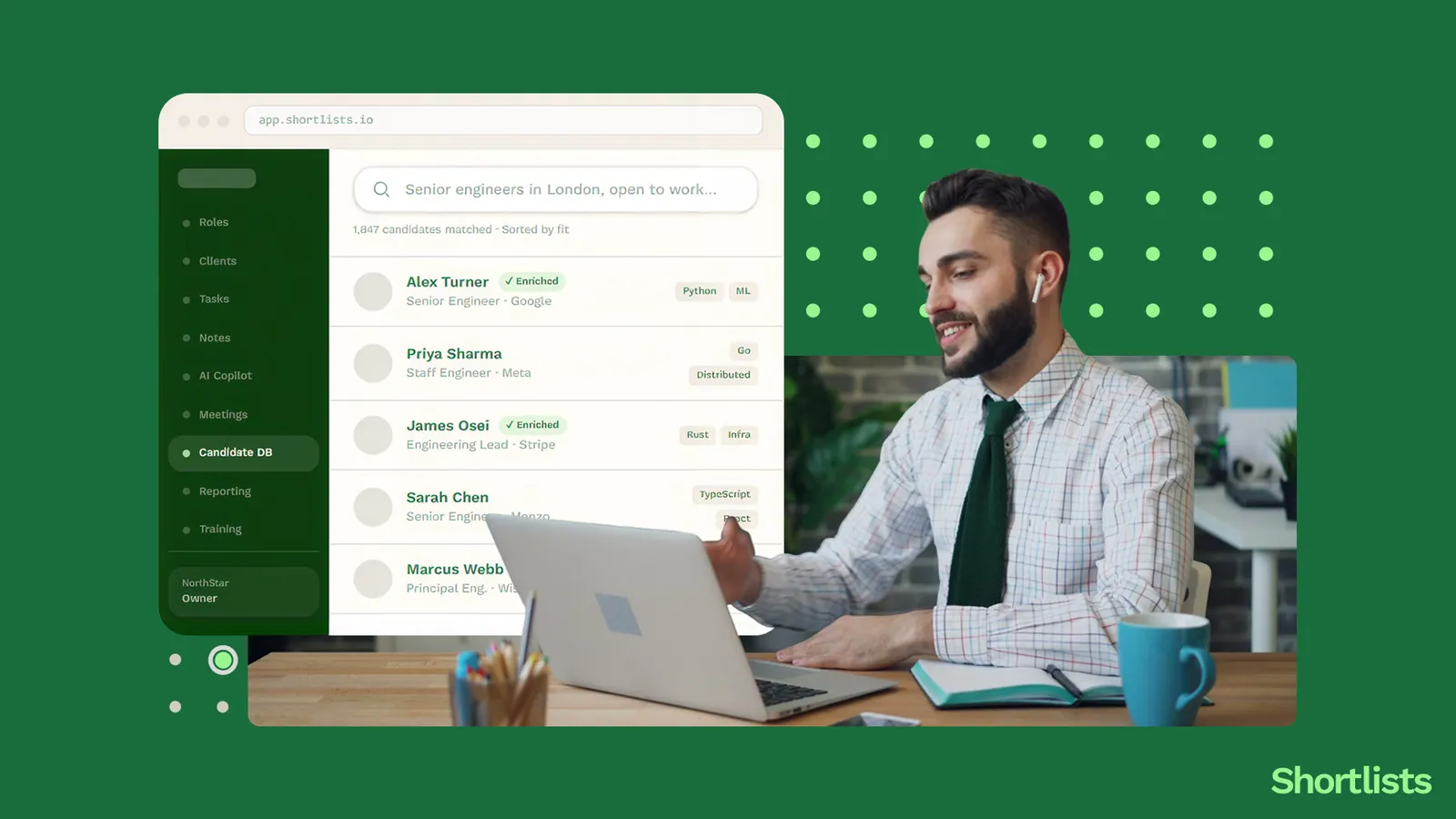
A 5-person UK recruitment agency on Bullhorn pays around £35,000 a year before AI add-ons, integration costs, or onboarding fees. Half the platform sits unused. The annual contract auto-renews on a date nobody can quite remember. The team has typed the same Boolean string into the same search box for three years.
This is the guide for the agency owner who's done with that. Or done with Vincere after the Access Group acquisition. Or done with Firefish, Loxo, or Atlas. We'll cover when it's actually time to switch, what migration really looks like, how to escape an annual contract without paying twice, and which alternative fits which current platform.
Short answer up top: for a 2-10 person UK agency, switching is far less painful than it used to be. A modern migration takes 2-3 weeks, costs nothing if you choose a vendor offering white-glove migration, and produces less than 4 hours of user-facing downtime. The biggest blocker is usually the existing annual contract — and there's a clean way around that too.
We'll get into the detail.
When is it actually time to switch?
Switching CRMs is a decision agency owners delay for years. Sometimes that's right (your current tool is fine, the team is productive, the cost is bearable). Sometimes it's wrong (the team is hating it daily, the cost is climbing, every new feature is a paid add-on).
Three honest tests.
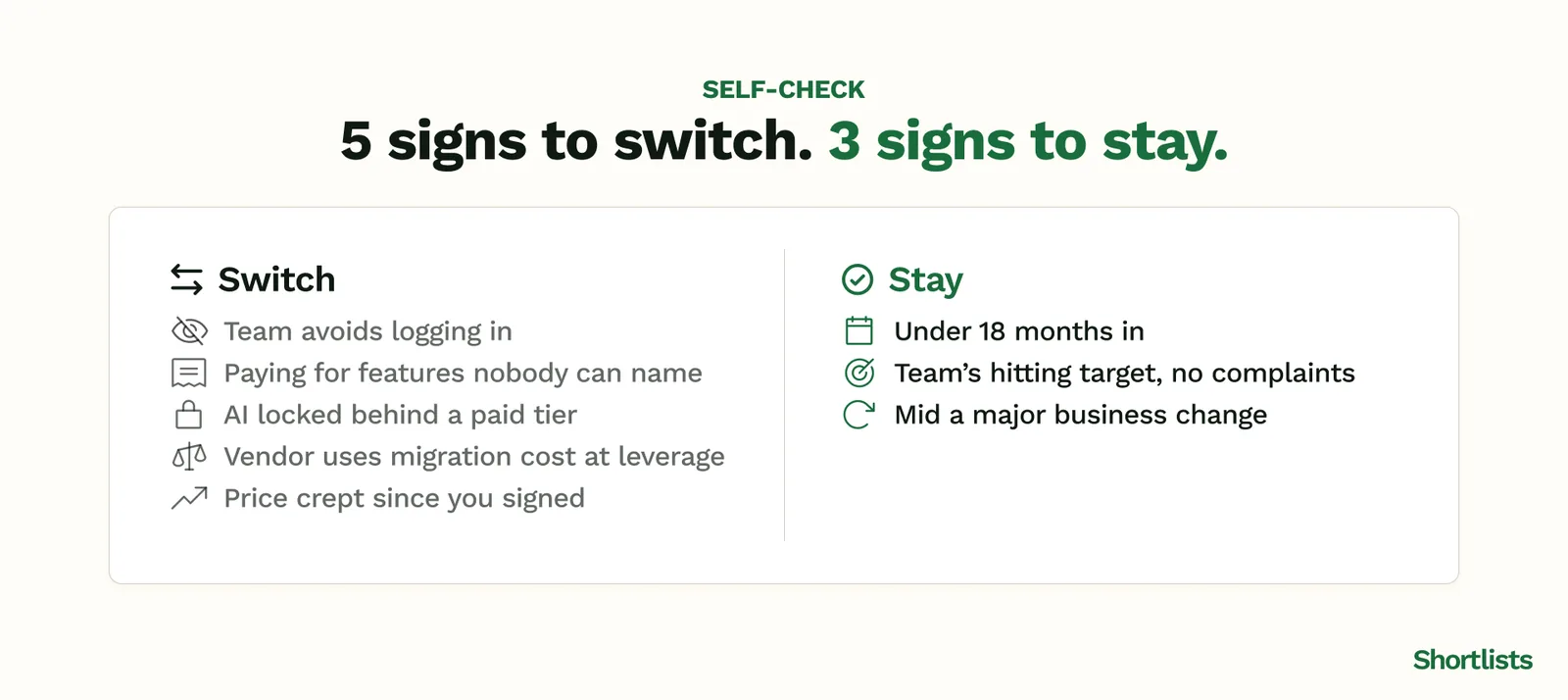
The 5 signs you've outgrown Bullhorn or Vincere
You've outgrown your current CRM when:
- The team avoids using it. Whichever screen your recruiters live in (Gmail, LinkedIn, a spreadsheet), it isn't the CRM. The CRM is where they update things on Friday so nobody asks them about it on Monday.
- You're paying for features you can't name. When you ask the team what your CRM does, they list 4 things. When you read the invoice, you're paying for 25.
- AI is a paid add-on. Bullhorn Amplify, Vincere Evo — same pattern. The AI features that should be standard in 2026 sit behind a £20-40/user/month upgrade tier.
- Migration cost is being held over your head. The CSM has dropped two emails this year reminding you "switching is expensive." That's a moat dressed up as advice.
- Pricing has crept. What you signed for in year 1 is not what you're paying in year 3. The contract auto-renewed at a higher number. The CSM apologetically explains "we had to standardise pricing."
If two or three of these describe you, you've probably crossed the threshold.
The 3 signs you should stay
We respect the craft. Sometimes staying is the right call.
- You're under 18 months in. First-year migrations are usually about new features and excitement, not real product-fit problems. Give your current tool a fair shake.
- The team is genuinely productive on the current tool. If your team is hitting target, finding candidates fast, and not complaining, the cost of switching exceeds the benefit.
- You're 6 months from a major business change. Don't switch CRMs while integrating an acquisition, hiring 3 new recruiters, or rebuilding your service line. Stabilise first.
Cost crossover point — when the savings clear the switching cost
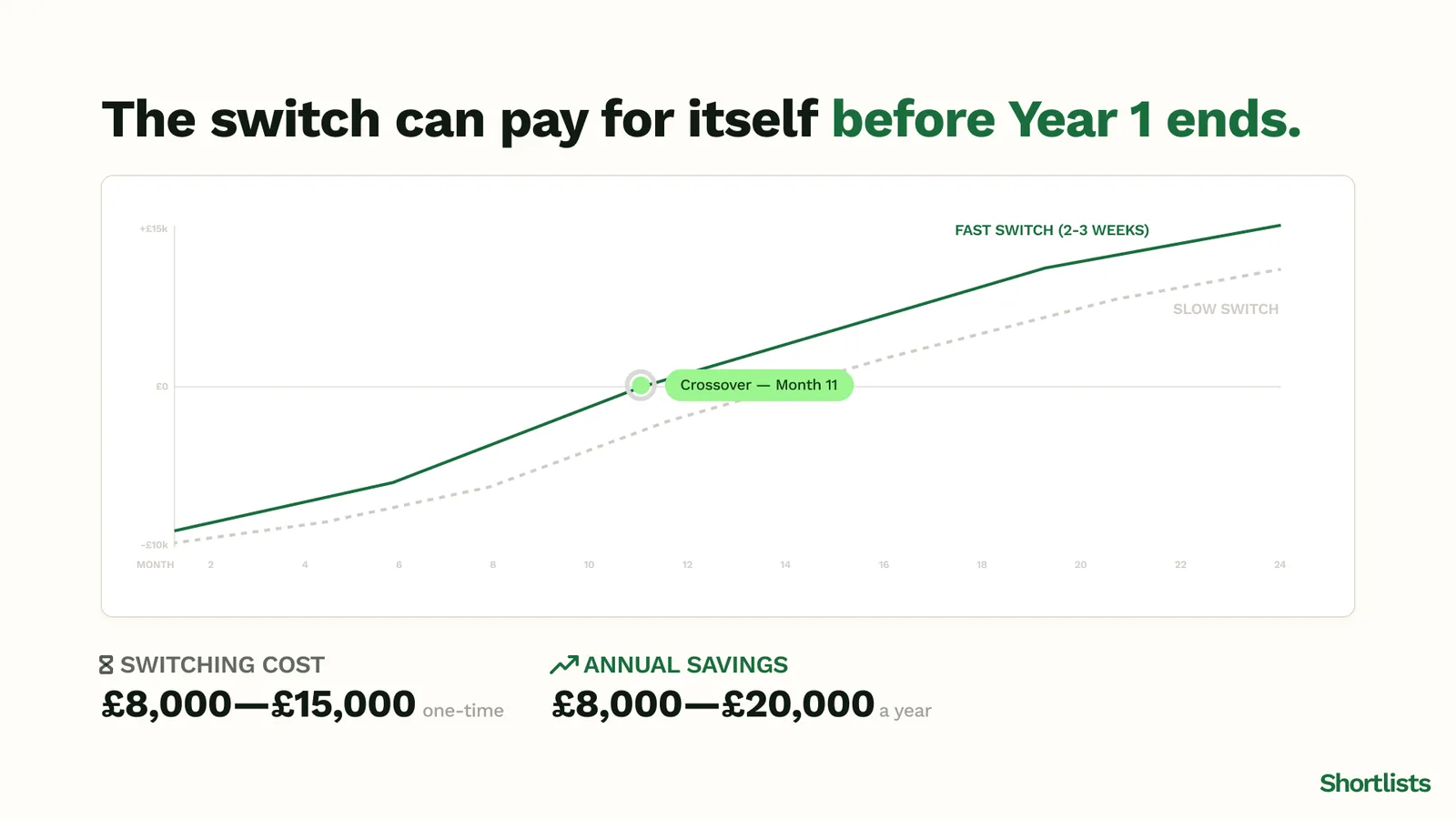
The economic test. Roughly:
- Switching cost ≈ 2-4 weeks of team productivity loss + 1 week of admin overhead. For a 5-person agency, call it £8,000–£15,000 of revenue impact.
- Annual savings from moving to an all-in-one platform without an AI tax: typically £8,000–£20,000 a year for a 5-person agency on Bullhorn or Vincere with AI add-ons.
The crossover point is usually inside Year 1. If you can land the switch and clear the productivity dip in 2-3 weeks, the maths works in Year 1. If you're choosing a tool with a slower onboarding curve, push the crossover to Year 2.
What the data says about why UK agencies leave
We talk to UK agency owners on Bullhorn, Vincere, Firefish, Loxo and Atlas every week. The patterns are consistent.
Bullhorn — top 5 reasons UK agencies leave in 2026
- Cost has run away from value. Bullhorn's UK pricing has crept above £200/user/month all-in (licence + AI tier + key integrations) for the segments small agencies care about. That's £12k+/year per recruiter.
- AI sits behind Bullhorn Amplify. Anything an agency wants to use AI for (matching, notetaking, outreach) lives in a paid add-on.
- The platform is built for staffing scale. Bullhorn's strongest features were designed for high-volume staffing — contractor management, VMS integration, bench reporting. Most boutique UK agencies don't use any of it.
- The UI feels heavy. Three decades of feature accretion produces a dense interface. Recruiters from younger agencies look at the screen and ask, "is this Outlook from 2010?"
- Annual contracts auto-renew. The friction of leaving is the friction of remembering to give notice 90 days before the anniversary. Many don't, and pay another year.
For the full deep-dive, see Bullhorn alternatives in detail.
Vincere — what changed after the Access Group acquisition
Vincere was bought by The Access Group in 2022. The acquisition added scale, sales capacity, and an enterprise GTM motion. It also changed what Vincere is.
The pre-acquisition Vincere was a UK-founded, scrappy, mid-market recruiting CRM with strong customer love. Post-acquisition Vincere is part of a £1.7bn enterprise software portfolio with a sales motion to match. Small UK agencies report:
- Pricing has hardened. Where pre-acquisition Vincere was flexible on terms for small teams, post-acquisition it's standardised upward.
- Support has become formal. Tickets go into a queue. The named CSM relationship has thinned.
- Roadmap priorities have shifted. Features useful to enterprise (compliance modules, advanced reporting) ship faster than features useful to a 5-person agency.
None of this is a crime. It's what happens when a company is bought by a strategic acquirer. It's also why small agencies are now in market for alternatives. For the longer treatment, see Vincere after the Access Group acquisition.
Firefish — where it's strong, where small agencies grow out of it
Firefish does several things well: UK-built, recruitment-marketing focused, strong on website integration. Small agencies that grow out of it usually grow out of two things specifically:
- The AI layer is light. Firefish has been slower than the market to ship genuinely useful AI features (notetaker, plain-English search, AI matching). For agencies running BD-led growth in 2026, that's a gap.
- The platform feels CMS-flavoured. Firefish's recruitment-website heritage shows. For agencies that don't need their CRM to also be their marketing CMS, the surface area feels mismatched.
Loxo — the AI-native pitch and where it falls short for UK teams
Loxo is the closest competitor to Shortlists in spirit — AI-native, modern, fast. Where it falls short for small UK teams:
- US-built and US-priced. Pricing is in USD and is optimised for the US mid-market. A 5-person UK agency often finds Loxo's all-in cost higher than expected once GBP conversion + integrations are layered.
- Data residency questions. Loxo's UK data residency story has improved but is not as clean as a UK-built platform with EU/UK-only hosting.
- Sales-led onboarding. The Loxo demo-to-quote-to-onboarding flow is longer than UK small-agency owners typically want.
Atlas Recruit — the niche it serves and where it doesn't
Atlas Recruit is a strong choice for a specific kind of UK agency — typically perm-only, mid-market, with a particular workflow shape. Where it doesn't fit: agencies running contract or hybrid models, agencies that need BD signal intelligence, and agencies that want AI as standard rather than as an add-on tier.
How to switch without losing data
Migration in 2026 looks nothing like migration in 2016. The tooling is better, the field-mapping is AI-assisted, and the cutover process is operationally boring (which is what you want).
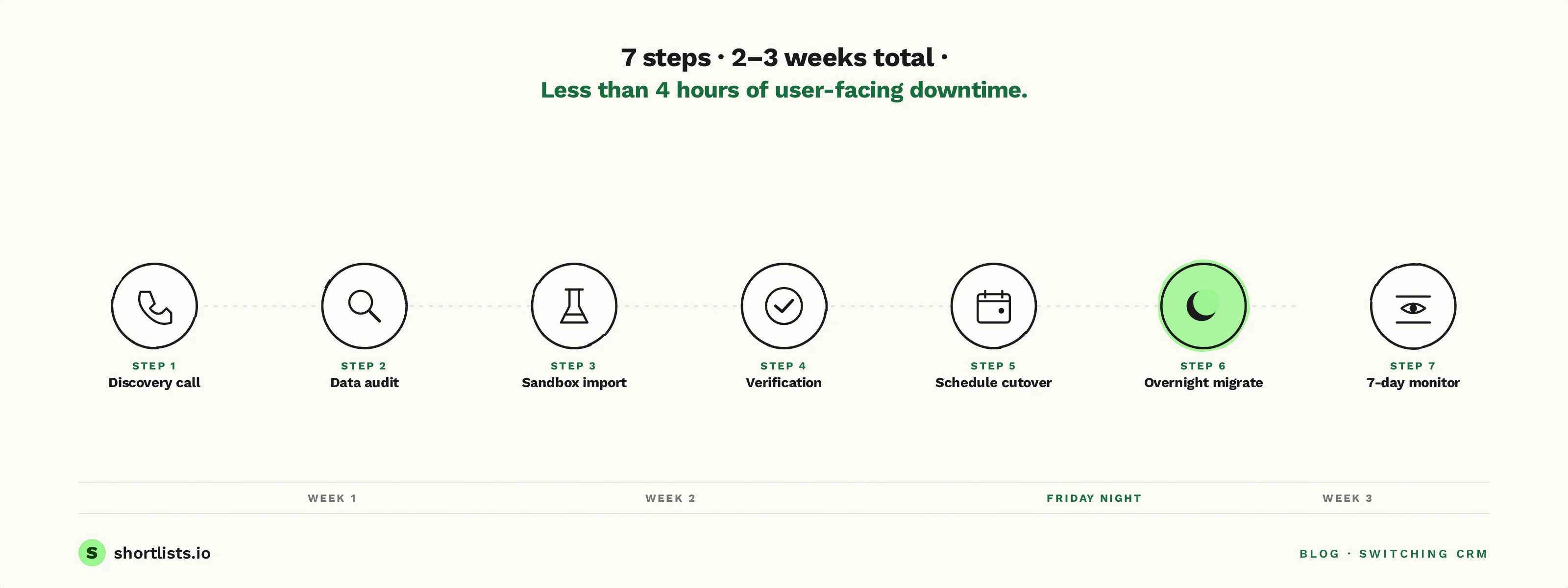
The 7-step migration playbook
- Discovery call (20 mins). Your new vendor looks at what platform you're on, how many users, how many records, what custom fields you've added over the years, and what integrations are live.
- Data audit. Every field in your current CRM is mapped to a field in the new one. This is the step where issues are found, not at cutover. Custom fields, archived data, deleted-but-recoverable records — all flagged here.
- Sandbox import. A full copy of your data lands in a test environment of the new platform. You can log in, search, click around, and stress-test.
- Verification. You check the things that matter: total candidate count, total client count, the last 50 placements, your most-used custom field, email threads attached to the right records. The new vendor gives you a verification checklist.
- Schedule cutover. Usually a Friday night. The vendor confirms the migration window, freezes writes on the old platform, and runs the final delta sync.
- Overnight migration. Data moves during off-hours. Total user-facing downtime is typically under 4 hours.
- 7-day parallel monitoring. The old platform stays live (read-only) for 7 days as a safety net. If anything's missing, it's caught and fixed before the safety net comes down.
For the longer treatment, see what overnight migration means.
The 4 data fields that always trip migrations up
In our experience, four fields cause more migration pain than the other 80 combined.
- Custom candidate status fields. Agencies invent statuses over years — "Hot — 2024 Q3", "Backchannel — JL", "Cold but loved client". These are gold and have to map cleanly. They don't always.
- Email thread attachments. Threads are easy to migrate; thread attachments (CVs, signed docs, screenshots) are where bytes get lost.
- Integration tokens. OAuth tokens to LinkedIn, Gmail, Outlook, Calendly all need to be re-authorised in the new platform. Not migrated.
- Free-text notes with no field structure. The "Notes" field that ten different recruiters have used in ten different ways. Some agencies discover during migration that 30% of their best context lives there.
A good migration process flags all four in the audit step, not at cutover.
How long it really takes
Honest numbers for a 5-person UK agency:
- Discovery to verification: 5-7 business days
- Sandbox testing: 3-5 business days
- Cutover weekend: Friday evening to Monday morning, ~12-16 hours of work for the vendor, under 4 hours of user-facing downtime
- Parallel monitoring: 7 days
Total: 2-3 weeks. Anyone telling you 3 days is selling. Anyone telling you 3 months is hedging.
How to escape an annual contract without paying twice
This is the question that stops more switches than anything else. The honest answer is: it's solvable.
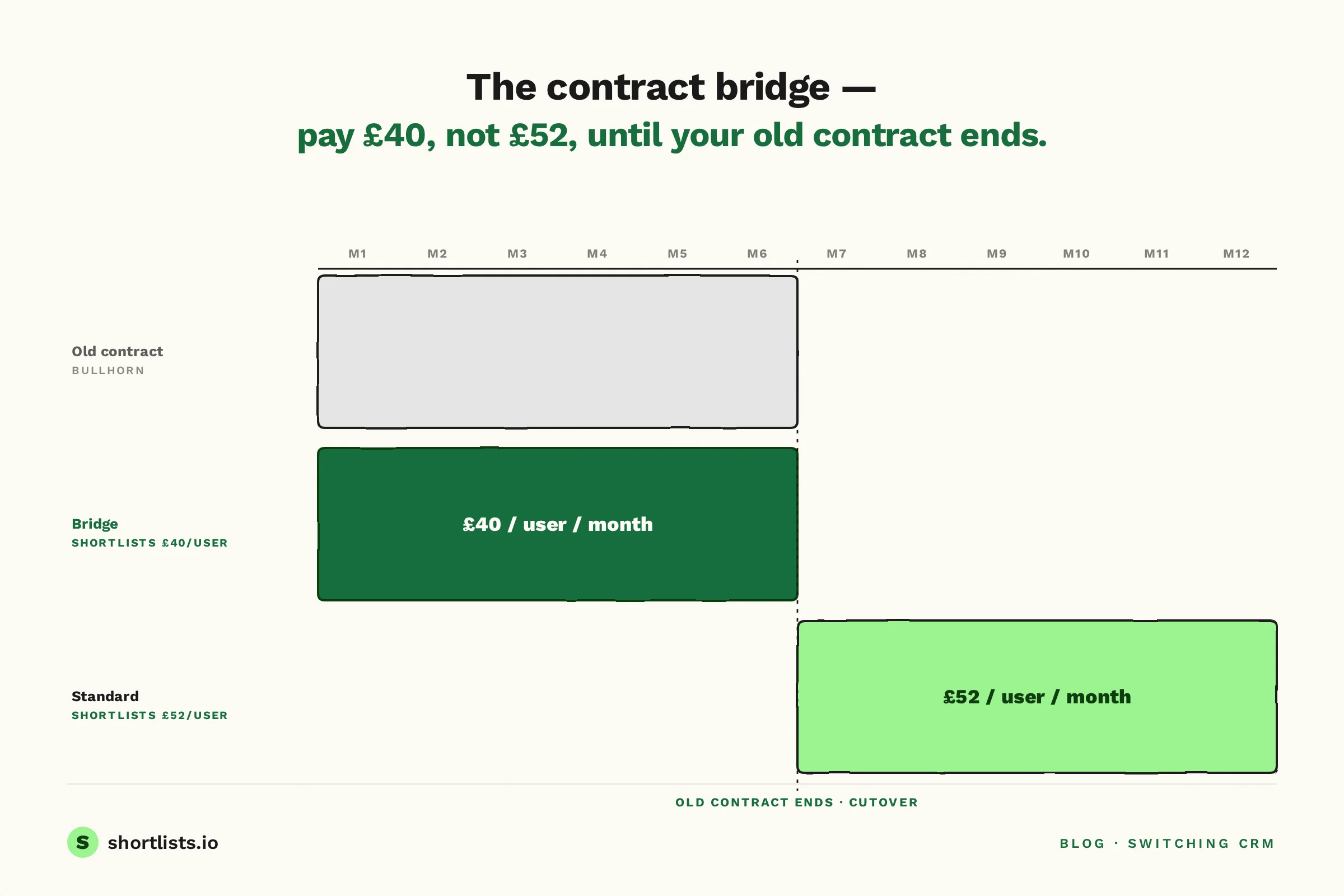
Contract bridge offers explained
A contract bridge is a discounted pricing tier offered by the new vendor for the months your old contract is still running. The new vendor takes a margin hit during the overlap so the switching cost stops being a blocker.
At Shortlists, the bridge is £40/user/month for the first 6 months while your old contract is still paying out, then $120/user/month after that — which is our standard pricing. The bridge is available to UK agencies switching from Bullhorn, Vincere, Firefish, Loxo or Atlas.
For the full mechanics of bridge offers, see the contract bridge offer.
What to ask your new vendor before signing
Five questions. Get the answers in writing.
- Is there a migration fee? (There shouldn't be.)
- Do you offer a contract bridge if I'm exiting an annual contract? (If yes, how is it priced and how long does it run?)
- What's the cancel-anytime policy after I switch? (If they're locking you into another annual contract, you've just swapped one cage for another.)
- Who runs the migration — your team or a partner? (Vendor team = white-glove. Partner = third party, often paid, often slower.)
- What happens to my data if I cancel? (Full export, in standard formats, within 14 days, free.)
What to ask your current vendor when you give notice
Three questions, usually 60-90 days before your renewal date.
- What's the exact renewal date and what notice period applies? Get this in writing — it's surprisingly often misremembered.
- Can I receive a full data export in CSV or standard formats? This is your data. The vendor is required to provide it under UK GDPR.
- What's the read-only access window after my contract ends? Some vendors offer 30-60 days; some don't. Plan accordingly.
A template termination email
Subject: Notice of non-renewal — [Your Agency] account
Hello [CSM name],
This email serves as formal notice that we will not be renewing our [Bullhorn / Vincere / Firefish / Loxo / Atlas] contract beyond the current term ending [date]. Please confirm:
- The exact contract end date and any final invoice schedule.
- The process for full data export, in CSV or standard formats, with all candidate, client, job, note and email-thread records.
- Any read-only access window post-contract-end.
We've appreciated working with [vendor] and the migration will be handled professionally. Looking forward to your confirmation.
Best, [Your name]
Polite, firm, unambiguous, in writing.
What "free migration" actually includes
"Free migration" varies wildly by vendor. Three definitions worth keeping straight.
White-glove migration vs DIY export-import
- White-glove migration: the new vendor's team extracts your data from the old CRM, maps fields, imports, validates, and runs the cutover. You verify; they do.
- DIY export-import: you export your data, the new vendor imports it. They give you a CSV template. You spend a weekend matching columns.
- Partner migration: the new vendor recommends a third party (often £3-8k for a 5-person agency) who handles the migration. This is migration with extra steps.
White-glove is what Shortlists offers as standard. Always ask which kind of "free" you're being sold.
The 8 file types your new CRM needs from your old one
A complete migration moves all eight:
- Candidate records (name, contact, profile, tags)
- Client records (company, contact, hiring manager, history)
- Job records (open and closed roles, stages, outcomes)
- Placement records (fees, dates, splits, status)
- Notes (structured and free-text)
- Email threads (with attachments)
- Documents (CVs, signed agreements, NDAs)
- Activity history (calls, meetings, status changes)
If a "free migration" only covers 1-5, you're leaving four file types behind. Ask explicitly.
What gets lost (and what to back up before you start)
In 99% of well-run migrations, nothing material is lost. In the 1% where something is, it's almost always:
- Inline attachments inside email threads. Solution: ask your vendor for an attachments-specific export before cutover.
- Custom field values that don't map cleanly. Solution: catch in the audit step, not at cutover.
- Calendar event history older than 12 months. Solution: most calendar systems don't migrate well between CRMs — back up via the calendar tool's own export.
Back up your data the week before cutover anyway. Belt-and-braces.
Which alternative is right for which agency
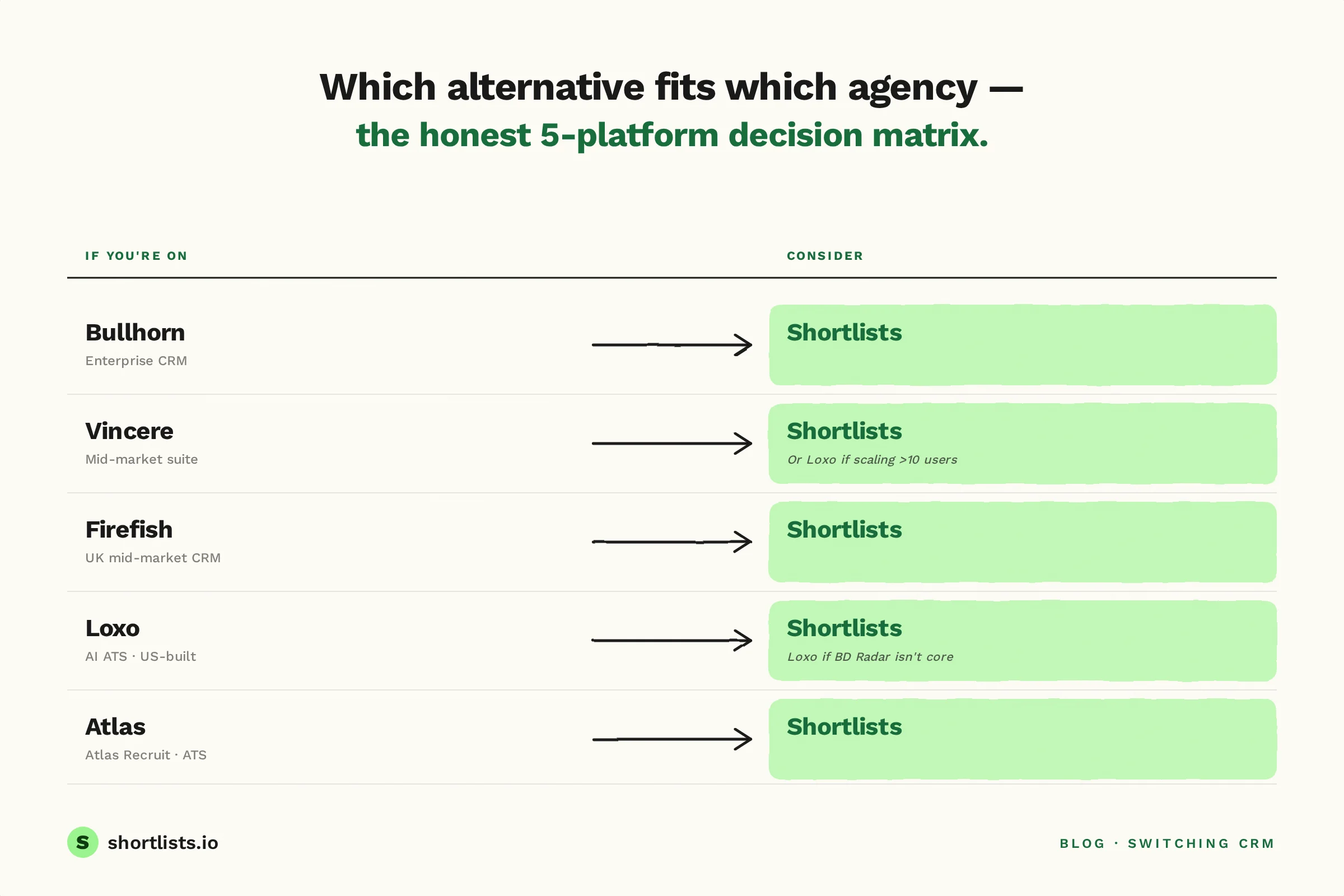
The honest matrix.
If you're on Bullhorn
- Best fit: Shortlists (small UK agency 2-10 users, AI-native, no annual contract, $120/user/month).
- Consider: Loxo (if you're 10-20 users and Anglo-American, AI-native, willing to price in USD).
- Stay on Bullhorn if: you're 15+ users, run high-volume staffing, and use VMS integration heavily.
If you're on Vincere
- Best fit: Shortlists (UK-built, similar pipeline-first feel, no Access Group overhead, no annual contract).
- Consider: Bullhorn (rarely — only if you're scaling above 15 users and need enterprise staffing features).
- Stay on Vincere if: the Access Group support model works for you and the pricing has stayed flat.
If you're on Firefish
- Best fit: Shortlists (modern AI layer, BD signal intelligence, decoupled from the marketing-website surface).
- Stay on Firefish if: the recruitment-marketing integration is core to your operation and you don't need heavy AI.
If you're on Loxo
- Best fit: Shortlists (UK-built, UK-priced, UK-hosted — same AI-native shape without the USD pricing or US-centric onboarding).
- Stay on Loxo if: you're operating across UK and US markets and the unified platform matters.
If you're on Atlas Recruit
- Best fit: Shortlists (broader feature set, BD Radar for signal-based prospecting, no annual contract).
- Stay on Atlas if: you're a perm-only mid-market firm and Atlas's specific workflow matches yours.
Pricing — the honest comparison
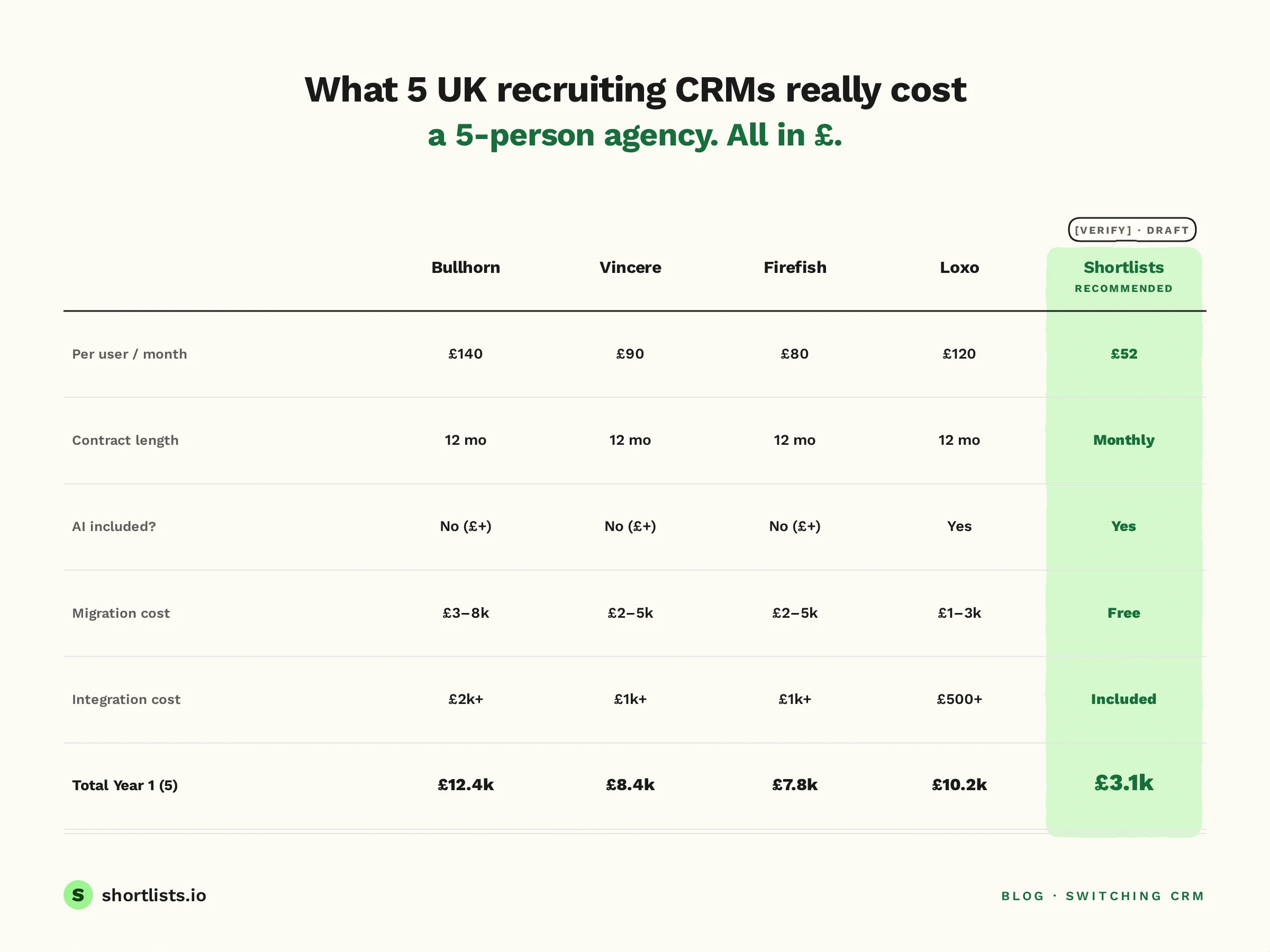
We don't quote competitor pricing precisely because pricing changes and varies by deal. What we can say with confidence:
- Per-user/month standard pricing: Shortlists $120. Loxo broadly comparable in GBP equivalent. Bullhorn and Vincere typically £20-40 higher all-in with AI included. Firefish and Atlas in similar range to Bullhorn/Vincere depending on tier.
- Contract length: Shortlists monthly. Most competitors annual minimum.
- AI included: Shortlists yes. Bullhorn (Amplify), Vincere (Evo) — paid add-on tiers. Firefish — basic AI included, advanced features extra. Loxo — yes.
- Migration cost: Shortlists free, white-glove. Most competitors paid or partner-led.
- Integration costs: Shortlists includes LinkedIn, Gmail, Outlook, Folk, HeyReach in standard pricing. Some competitors charge per integration.
For the live pricing breakdown, see Shortlists pricing.
Frequently asked questions
What is the best Bullhorn alternative for a small UK agency?
For 2-10 person UK agencies, the best Bullhorn alternatives are platforms built specifically for small teams with monthly contracts. Shortlists ($120/user/month, no contract, AI-native, UK-built) is the closest fit. Loxo works for larger small agencies; Bullhorn itself rarely fits below 10 users economically.
How do I switch recruitment CRM without losing candidate data?
Use a 7-step playbook: audit current data, request full export from current vendor, validate field mapping with new vendor, run a sandbox import, verify candidate count and key fields, schedule overnight cutover, run parallel for 7 days as a safety net. Shortlists offers free white-glove migration with all seven steps managed for you.
Can a recruitment agency switch CRM while still inside an annual contract?
Yes. Some new vendors (including Shortlists) offer a contract bridge — a discounted rate for the months your old contract is still running, so you don't pay full price twice. Always check if your current contract has an early termination fee and negotiate before signing the new contract.
What does free CRM data migration mean for a recruitment agency?
Free migration varies by vendor. White-glove migration means the new vendor extracts your data from the old CRM, maps it to their fields, imports it, and validates it — all included. DIY migration means you export, they import. Always ask which one is free and what's included.
Is it possible to migrate from Bullhorn overnight without downtime?
Yes, with the right process. Overnight migration means the cutover happens during off-hours: parallel run on the new platform for 24-48 hours, then DNS or login switch, then a 7-day parallel monitoring window. Total user-facing downtime is usually under 4 hours.
Which recruiting CRMs offer free data migration with white-glove support?
Shortlists offers free white-glove migration as standard for UK agencies switching from Bullhorn, Vincere, Firefish, Loxo, or Atlas. Loxo offers paid migration in onboarding. Bullhorn and Vincere typically bundle migration into setup fees rather than offering it free.
How Shortlists handles switching
Shortlists offers white-glove migration as standard for UK agencies switching from Bullhorn, Vincere, Firefish, Loxo or Atlas. The process:
- Free. No migration fee, no setup fee, no per-record charge.
- 7-step playbook above. Discovery → audit → sandbox → verification → cutover → 7-day parallel monitoring.
- Contract bridge offer. £40/user/month for the first 6 months if you're exiting an annual contract with another vendor, then standard $120/user/month thereafter.
- No annual contract on the new side. Month-to-month. Cancel any month. Full data export on the way out.
A 5-person UK agency switching from Bullhorn typically saves £10,000–£15,000 in Year 1 versus their previous all-in cost (licence + AI add-on + integrations + migration partner fees).
If that sounds useful, see the migration process, Shortlists pricing, or white-glove migration.
Next steps
If you're switching from Bullhorn:
If you're switching from Vincere:
- Read Vincere after the Access Group acquisition.
- See Shortlists vs Vincere.
If you're still inside an annual contract:
- Read the contract bridge offer.
- Read the real cost of annual lock-in.
If you want the broader context:
Last updated 27 May 2026. Switching numbers move every quarter — if pricing or process detail here is out of date, tell us and we'll fix it the same day.